
Product Updates September
Shipped in September Returns portal: return or claim, asked up front Return and claim are two different paths. Until now the customer told them apart inside one list of reason codes. ...
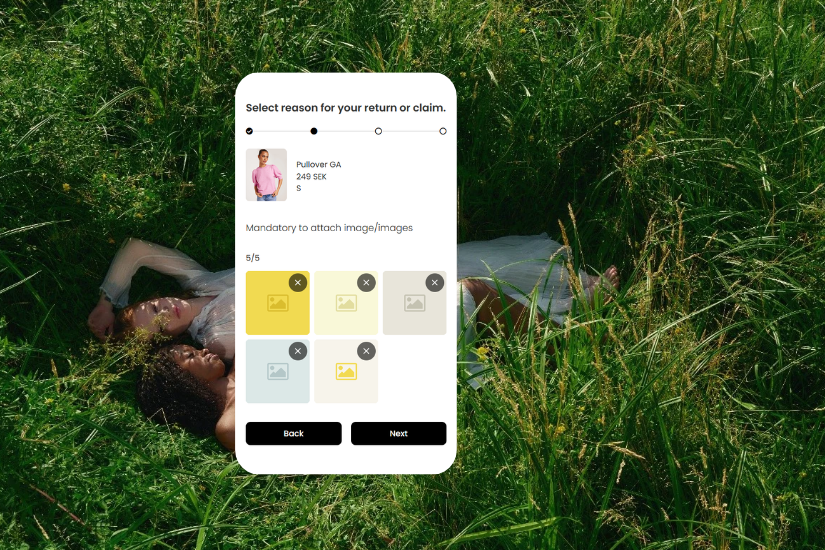
The returns portal takes up to five photos per item.
The customer can add them one at a time or several at once, and remove one to swap it. The portal counts them as they go in and says when five is reached. Photos are resized before upload, so five stay quick on a mobile connection.
The whole chain carries them. The ticket shows up to five photos per line, and the claims report gives each photo its own column.
Reason codes that require a photo still require at least one, and nothing else in the flow changes.
Stadium, Icebug, Nilson Group, HFN, Nordic Nest, Royal Design and Nordic Knots all asked for five.
What this means:
Shopify stores can offer exchanges.
When a customer picks a replacement, Inretrn reads variants and stock straight from your store, so they only see the sizes and colours you actually have.
It uses the same exchange setup as Centra, Brink, Omnium and Viskan. Nothing new in the portal, and nothing to configure beyond connecting the store.
If Shopify is your platform, exchanges are yours to offer.
What this means:
As we have shared in earlier product updates, we are rebuilding the merchant portal step by step around one simple idea: you should always know where you are, what is going on and what to do next. This month we have taken another step in that direction.
For you, this means a cleaner and more consistent interface for Product groups, Reason codes, Carriers, Digital returns, API keys and Users.
We continue to make these changes gradually, so that nothing changes overnight. Each release moves a little more of the portal onto the new foundation. Same data, same actions, nothing to relearn.
After all, when things just work, everyone is happy.
What this means:
Alongside the look, we have worked on what the portal says. Pages state more plainly what a setting does and what changes when you turn it on.
There is also a feedback button in the portal. It is what we go through when we decide which pages to take next.
What this means:
The rest of the portal keeps moving onto the new foundation, in steps you can use right away rather than one big switch at the end. Expect it to arrive gradually across the coming releases, and expect your day to carry on uninterrupted while it does.
We’ll send you product updates when we release something that actually matters.
Shipped in September Returns portal: return or claim, asked up front Return and claim are two different paths. Until now the customer told them apart inside one list of reason codes. ...

What's new Shopify: the connector is live Last time we said it was almost here. It's here. Orders created in Shopify arrive in Inretrn as soon as they're fulfilled, so a return can be sta...

Shipped in May Ongoing connector: expanded workflows Returns don’t always start with the customer. Most return flows assume the customer registers a return, receives a label, and sends ...